There are no reviews yet. Be the first one to write one.

Good Lock APK
| Developer | Samsung Electronics Co. Ltd. |
| Released on | Apr 15, 2025 |
| Updated | Sep 8, 2025 |
| Size | 29.2 MB |
| Version | 3.0.13.1 |
| Requirements | 12 |
| Downloads | 1,000,000+ |
| Get it on | |

Description
Table of Contents
🚂 App Overview & Experience
Good Lock APK is a Samsung-exclusive customization platform that lets users transform the interface and functionality of their devices. From lock screens and notifications to taskbars, system UI modules, and multitasking panels, Good Lock provides advanced tools for personalized Android experiences.
With its modular design, users can select which features to install, offering flexibility and complete control over their Samsung smartphone or tablet. Unlike standard themes or basic customization options, Good Lock empowers you to create a unique interface that blends aesthetics with functionality.
Whether you want to enhance productivity, make your phone visually appealing, or fine-tune system behavior, Good Lock APK is an essential tool for Samsung users seeking deep customization without rooting. Regular updates bring new modules and features, ensuring your device always has fresh options for personalization.
✨ Core Features
- 🔒 Lock screen customization – adjust style, shortcuts, and notifications with LockStar.
- 🎨 Themes, colors & wallpapers – personalize backgrounds, icons, and overall visual design.
- 🛠️ Modular UI tweaks – add or modify system modules such as QuickStar, Task Changer, and Edge Lighting.
- 📱 Enhanced multitasking & edge panels – improve navigation, app switching, and productivity.
- ⚡ Quick adjustments – modify sound, layout, gestures, and performance settings instantly.
- 🏆 Regular module updates – get new features and improvements with each app update.
- 🌐 User-friendly interface – easy configuration for beginners and advanced users alike.
- 💾 Backup & restore settings – save your preferred customizations to avoid losing changes.
- 🖼️ Edge and notification enhancements – add interactive edge panels, smart notifications, and quick-access shortcuts.
🛤️ Usage & Mechanics
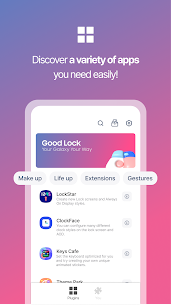
Once you complete the Good Lock APK download, open the app to browse its modules. Popular modules include:
- LockStar – fully customize your lock screen with widgets, shortcuts, and wallpapers.
- QuickStar – personalize quick settings like brightness, sound, and connectivity toggles.
- Task Changer – modify recent apps layout and multitasking behavior.
- EdgeLighting+ – add dynamic edge lighting effects for notifications.
- SoundAssistant – customize audio settings and individual app volumes.
- Nice Catch – track notifications, screenshots, and system events.
Each module comes with intuitive controls for changing layouts, colors, gestures, and more. Users can mix and match modules, creating a fully customized Samsung experience tailored to their workflow, style, and preferences.
👍 Pros & ⚠️ Cons
Pros:
- Official Samsung app ensuring full compatibility and stability
- Modular design allows customization without rooting
- Enhances productivity, aesthetics, and system usability
- Easy to install, manage, and update individual modules
- Supports Samsung-specific features such as Edge Panels and One UI
Cons:
- Limited to Samsung devices with compatible Android versions
- Some modules may require additional plugins to unlock features
- Updates may occasionally reset certain customizations
- Learning curve for beginners exploring multiple modules
🧠 Tips for Best Use
- Explore each module individually to understand its features and potential benefits.
- Combine modules such as LockStar + QuickStar for a fully personalized interface.
- Regularly check for updates to access new customization options.
- Backup your settings before applying major changes to avoid losing progress.
- Experiment with colors, gestures, layouts, and panels to optimize efficiency.
- Use SoundAssistant to manage audio preferences and improve device control.
- Enable Edge Lighting and Nice Catch for notifications and system tracking.
❓ FAQs
Q1: What is Good Lock APK?
It’s a Samsung app that lets users customize lock screens, notifications, multitasking panels, and system UI modules.
Q2: Is Good Lock APK free?
Yes, it’s free for all Samsung users with compatible devices.
Q3: Can I use Good Lock on non-Samsung devices?
No, it’s exclusively designed for Samsung smartphones and tablets running supported Android versions.
Q4: Does Good Lock require internet?
Some modules may require internet to download updates, but core customization features work offline.
Q5: Can I save my customizations?
Yes, the app supports backup and restore options, allowing you to retain your personalized settings.
Q6: Is rooting required to use Good Lock?
No, all customization features are available without rooting, making it safe for regular Samsung users.
🎯 Why Choose Good Lock APK?
Because it provides unmatched control over Samsung device customization. With Good Lock APK, users can:
- Transform lock screens, notifications, and system UI to fit their style
- Enhance productivity with smart edge panels and multitasking tweaks
- Combine aesthetics with functional improvements for better daily usage
- Use a modular, user-friendly system that allows selective installation and updates
Good Lock APK is the ultimate Samsung personalization app, perfect for anyone who wants a device that looks, feels, and functions exactly the way they want.
⚙️ Installation Guide
- Download the Good Lock APK file.
- Enable Unknown Sources in your device settings.
- Install the APK and open the app.
- Browse and install desired modules such as LockStar, QuickStar, or Task Changer.
- Customize your Samsung device interface fully and enjoy a unique, optimized user experience.
What's new
A new option has been added to the wallpaper settings, allowing you to set an image as the cover screen.