




0.0 out of 5 stars (based on 0 reviews)
There are no reviews yet. Be the first one to write one.

| Developer | Apple |
| Released on | Sep 16, 2015 |
| Updated | May 19, 2025 |
| Size | 9.96 Mb |
| Version | 4.0.3 |
| Requirements | 6.0 |
| Downloads | 100,000,000+ |
| Get it on |  |
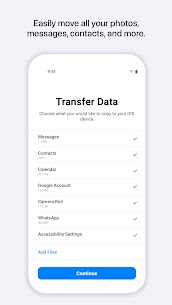
Move to iOS APK is Apple’s official data migration tool designed to make switching from Android to iPhone effortless. Instead of manually transferring contacts, photos, messages, and other important data, this app automates the process, ensuring your new iPhone feels familiar and ready to use from day one.
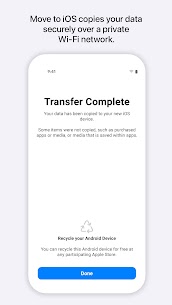
The app uses a secure, encrypted Wi-Fi connection to transfer data without the need for cables, extra apps, or computers. From personal files to app suggestions, Move to iOS APK simplifies the transition while keeping your information safe and intact. Whether you’re upgrading to the latest iPhone or switching ecosystems for the first time, this app is the easiest way to move all essential Android data to iOS.
📱 Transfer Contacts, Messages, and Call Logs – Ensure your personal connections and communications move seamlessly.
🖼️ Move Photos and Videos Securely – Keep memories intact with encrypted media transfers.
📂 Sync Calendars and Email Accounts – Keep your appointments and emails organized on your new device.
📲 App Suggestions – Automatically recommends iOS equivalents for Android apps installed on your device.
🔒 Encrypted Wi-Fi Transfer – Transfers are secure, protecting sensitive data during migration.
⚡ Quick Setup Without Cables – No need for USB cables or computers; simply use Wi-Fi.
Using Move to iOS APK is straightforward:
Once completed, your iPhone will have all selected Android data organized and ready for use. The app ensures a smooth, hassle-free experience without any technical complications.
Pros:
Cons:
Q1: What is Move to iOS APK?
It’s Apple’s official Android app for transferring contacts, photos, messages, and other essential data to an iPhone.
Q2: Can I use it after setting up my iPhone?
No, the app only works during the initial iPhone setup process.
Q3: Is the transfer secure?
Yes, all transfers are done via encrypted Wi-Fi, keeping your data private and safe.
Q4: Does it move apps?
It doesn’t transfer Android apps directly. Instead, it suggests equivalent iOS apps that you can install from the App Store.
Q5: Do I need an internet connection?
Yes, Wi-Fi is required to establish a secure connection between your Android and iPhone.
Switching from Android to iPhone can be daunting, but Move to iOS APK makes the transition simple, fast, and secure. With its encrypted transfers, automatic app suggestions, and ability to migrate contacts, messages, photos, videos, and calendar entries, it’s the most reliable way to move to iOS without losing important data.
This app is perfect for:
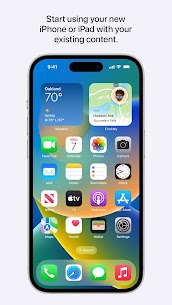
With Move to iOS APK, you can enjoy the new iPhone experience immediately without worrying about missing files or starting from scratch.
• Faster data migration using a cabled connection between your iPhone and your Android phone (USB-C or USB-C to Lightning) • Connect over WiFi or Personal Hotspot • iOS tips are now displayed during migration • Call history and Dual SIM labels are now migrated • Voice recordings are now migrated to the Voice Memos app or the Files app depending on the file format • New languages supported: Bangla, Gujarati, Kannada, Malayalam, Marathi, Odia, Punjabi, Tamil, Telugu, and Urdu
There are no reviews yet. Be the first one to write one.