




0.0 out of 5 stars (based on 0 reviews)
There are no reviews yet. Be the first one to write one.

| Developer | Beijing Lingguang Zaixian Information Technology |
| Released on | Apr 28, 2020 |
| Updated | Sep 25, 2025 |
| Size | 69.8 Mb |
| Version | 3.0.17 |
| Requirements | 6.0 |
| Downloads | 1,000,000+ |
| Get it on |  |
Protake APK is a professional mobile cinematography app made for people who love creating videos with their smartphones. It is designed for content creators, vloggers, and filmmakers who want complete control over their camera settings while shooting. With this app, you can record videos that look like they were made using expensive professional cameras.
The app brings a full set of manual controls, cinematic filters, and LUTs that help you create beautiful and high-quality videos. Whether you are shooting a short vlog, travel video, documentary, or cinematic short film, Protake APK gives you the tools to make your content look more polished and professional.
Unlike regular camera apps, Protake allows you to control every camera setting such as ISO, shutter speed, exposure, focus, and white balance. You can also monitor your sound, apply filters in real time, and adjust your frame ratio according to your project. This makes it suitable for both beginners and professionals.
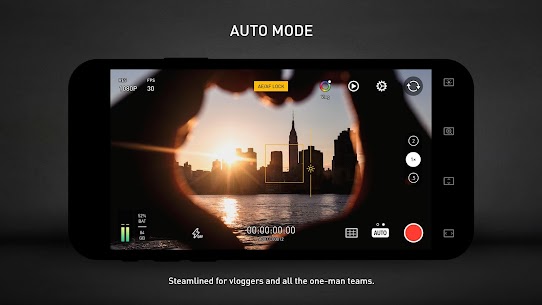
The app interface is clean and user-friendly, so even first-time users can start recording easily. Advanced users, on the other hand, can use histograms, zebra patterns, and focus peaking to achieve the perfect shot. Every video recorded in Protake can be exported in high-quality formats suitable for editing and publishing on any platform.
Whether you’re creating cinematic content for YouTube, short social videos, or storytelling documentaries, Protake APK transforms your smartphone into a professional filmmaking camera with advanced features and simple usability.
🎥 4K Ultra HD Recording – Record in stunning 4K quality with crisp details and professional-level clarity.
🎨 Cinematic LUTs & Filters – Choose from a variety of built-in color grading filters to give your videos a movie-like feel.
📸 Manual Camera Controls – Adjust ISO, exposure, focus, white balance, and shutter speed to match your lighting conditions.
🔲 Professional Aspect Ratios – Frame your shots in cinematic ratios like 16:9, 2.39:1, and more.
🎬 Real-Time Preview – Preview color changes, lighting adjustments, and filters before recording your video.
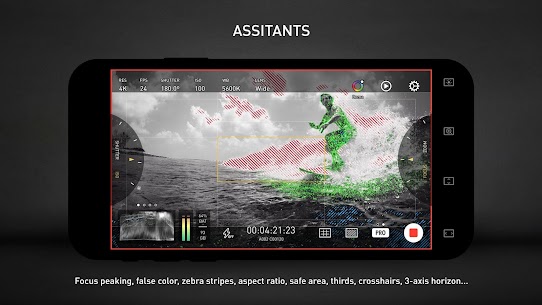
🕹️ Advanced Tools – Use grid lines, histograms, zebra patterns, and focus peaking to maintain perfect balance and exposure.
🎙️ Audio Monitoring – Keep an eye on your audio input to avoid low volume or background noise.
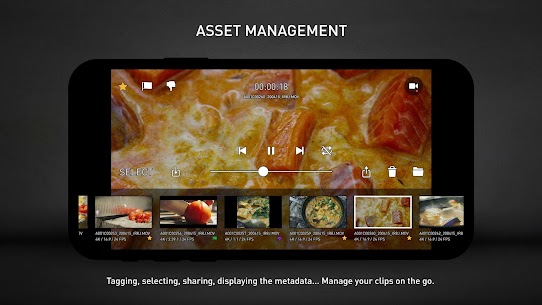
📂 Easy Export Options – Save your videos in multiple formats to edit them easily in other video editing apps.
With all these features combined, Protake APK gives you the same experience as using a real DSLR camera but right on your smartphone.
The Protake APK app gives you full control over your filming process. Whether you are recording for fun, making professional projects, or shooting creative short films, it helps you get the perfect result.
Manual Exposure Control: Adjust exposure and brightness levels manually for accurate lighting in every shot. This ensures that your video never looks too dark or overexposed.
Cinematic Presets: The app includes built-in LUTs and filters used by professionals to create movie-style looks. You can experiment with different tones and moods to match your story.
Focus & Zoom Control: Achieve smooth transitions using manual focus pulls and zoom effects, adding a cinematic touch to your videos.
Audio Optimization: Clear sound is just as important as clear visuals. With Protake’s audio monitoring feature, you can adjust input levels and eliminate unwanted noise while recording.
Frame Rate Options: Choose from various frame rates (24fps, 30fps, 60fps, etc.) to create cinematic slow-motion or fast-paced videos.
Composition Tools: Use grid overlays and histograms to ensure your framing, exposure, and lighting are all on point.
Whether you’re shooting indoors, outdoors, in low light, or bright sunlight, Protake APK helps you balance your visuals and achieve professional-grade footage. It’s ideal for creators who want DSLR-style control on a mobile device.
Pros:
Cons:
Overall, the pros clearly outweigh the cons. Protake APK provides the perfect balance between professional performance and user-friendly design.
📱 Use a Tripod: To avoid shaky shots and get stable, cinematic results.
🎬 Experiment with Aspect Ratios: Try 16:9 for standard widescreen and 2.39:1 for movie-style shots.
🌅 Manual Focus & Exposure: Use manual controls to maintain focus and lighting, especially in changing conditions.
🎞️ Shoot in 4K: Capture your videos in 4K resolution for higher editing flexibility.
🎨 Apply LUTs Wisely: Each LUT has its own tone—use them to match your video’s mood, such as warm, cool, or dramatic.
🎧 Monitor Audio: Always keep an eye on sound levels while recording to ensure clean voice and background balance.
🗓️ Plan Your Shots: Preparing a short script or storyboard can make your final video look more professional.
By following these simple tips, you can unlock the full potential of Protake APK and produce amazing cinematic videos directly from your smartphone.
Q1: What is Protake APK?
It is a professional mobile filmmaking app that provides manual controls, filters, and advanced camera settings to create cinematic videos using your phone.
Q2: Does Protake support 4K recording?
Yes, Protake APK supports full 4K Ultra HD recording for crystal-clear video output.
Q3: Is Protake suitable for beginners?
Absolutely. Even new users can use it easily due to its simple interface, while experienced filmmakers can explore the advanced features.
Q4: Can I use it for YouTube or social media videos?
Yes, it’s perfect for YouTubers, vloggers, TikTok creators, and filmmakers who want to create quality videos on the go.
Q5: Are cinematic LUTs included?
Yes, the app comes with a range of built-in LUTs for professional color grading and creative effects.
Q6: Can I monitor audio while recording?
Yes, Protake APK includes live audio monitoring to make sure your sound is clear and balanced.
Q7: What aspect ratios are supported?
You can choose from multiple aspect ratios including 16:9, 1:1, and 2.39:1 to match your filming style.
Q8: Does it work on all Android phones?
Most modern Android devices support the app, but performance may vary depending on hardware capabilities.
Q9: Is internet required for recording?
No, you can record videos offline without needing an internet connection.
Q10: Can I edit videos inside the app?
While basic adjustments are possible, it’s best to export your clips for detailed editing in dedicated video editing apps.
Protake APK is a complete mobile solution for anyone who wants to take their video creation skills to the next level. It combines high-quality recording, full manual control, and powerful tools into one easy-to-use app.
Instead of relying on expensive camera gear, this app allows you to produce cinematic-quality videos directly from your phone. From color grading to real-time previews, every feature is made to help you achieve professional results quickly.
Whether you’re a filmmaker, vlogger, content creator, or hobbyist, Protake APK lets you shoot, edit, and share stunning videos effortlessly. It’s a must-have app for anyone serious about smartphone videography.
Multiple bug fixes.


There are no reviews yet. Be the first one to write one.